Integrations, accounts, and permissions#
Command convention: this guide uses the installed rat-things shorthand. From a source checkout,
use npm run rat-things -- before the same arguments, or run npm run build && npm link once.
Rat Things turns trusted external APIs into agent-visible tools. One deployment can serve one person, a team, or an embedded product; every connection remains scoped to the authenticated owner. An owner can connect several accounts for the same service and grant each account different access. This is the account-connection step in the Rat Things operating model.
Built-in integrations use the same reviewed contract as services added in trusted host code:
discover integration -> supply credential -> verify provider account -> choose Rat access
                     -> configure notification bindings or declared Session tools -> launch autonomously
The Integration Contract v1#
| Object | Purpose | Secret material? |
|---|---|---|
| Integration manifest | Describes authentication fields and typed operations; implemented by a trusted plugin | No |
| Connection | One verified provider account for one Rat owner | No |
| Connection health | Bounded verification state and timestamps; never provider bodies | No |
| Credential binding | Host-only pointer to the encrypted credential | Reference only |
| Grant | Persistent Rat-side permission ceiling for one connection | No |
| Connection set | Reusable selection of accounts, including multiple accounts for one plugin | No |
| Source binding / schedule | Selects an Agent, environment and notification destinations | No |
The API accepts a credential, but it does not accept claims about which account or permissions that credential represents. The plugin verifies the credential against its fixed provider API and derives the account label, tenant/subject identifiers, provider access, and provider scopes. Only a successful verification creates the secret and connection metadata.
The credential value is never returned. It is not copied into an Agent or Session definition, DynamoDB record, MicroVM launch payload, App Server tool schema, model-visible environment variable, URL, or log.
1. Discover what the deployment supports#
Every UI, agent, and integration client starts with the same endpoint:
GET /v1/integrations/plugins
A manifest describes the exact authentication fields and operations installed in that deployment:
{
  "id": "stripe",
  "version": "1",
  "title": "Stripe",
  "authentication": [
    {
      "scheme": "api-key",
      "title": "Secret API key",
      "fields": [
        { "key": "api_key", "label": "Secret key", "secret": true }
      ]
    }
  ],
  "operations": [
    {
      "id": "stripe.customers.search",
      "kind": "search",
      "access": "read",
      "risk": "routine",
      "requiredProviderScopes": ["customers.read"]
    }
  ]
}
Consumers should render or request only the declared fields. Do not hard-code provider credential forms separately from the manifest. If a plugin offers more than one authentication scheme, the consumer asks the operator to choose one.
2. Connect and verify one account#
For the CLI, create a short-lived, owner-readable credential file containing only the fields from the selected authentication definition:
umask 077
printf '{"api_key":"replace-with-issued-key"}\n' > /secure/tmp/stripe.json

rat-things plugins
rat-things connect stripe \
  --credential-file /secure/tmp/stripe.json \
  --access read-only
rat-things connections
connect discovers the manifest, validates the exact field names, chooses the sole authentication
scheme when unambiguous, and defaults the Rat grant to read-only. Use --auth-scheme oauth2 when
a plugin has several schemes. --alias is optional: Rat derives a readable alias from the verified
provider label and adds -2, -3, and so on when needed.
The equivalent API request is deliberately small:
{
  "version": "1",
  "pluginId": "stripe",
  "authScheme": "api-key",
  "credential": {
    "api_key": "supplied-only-to-this-management-call"
  },
  "grant": {
    "version": "1",
    "preset": "read-only"
  }
}
The authenticated principal becomes the owner; callers cannot submit ownerId. The response
contains derived metadata and the initial grant, never the credential or vault reference:
{
  "connection": {
    "version": "1",
    "connectionId": "...",
    "ownerId": "api:authenticated-principal",
    "pluginId": "stripe",
    "alias": "stripe-acme-shop",
    "label": "Acme Shop",
    "externalTenantId": "acct_...",
    "authorization": {
      "scheme": "api-key",
      "access": "full",
      "scopeModel": "unknown",
      "scopes": []
    },
    "status": "active",
    "createdAt": "2026-08-22T12:00:00.000Z",
    "updatedAt": "2026-08-22T12:00:00.000Z"
  },
  "grant": {
    "version": "1",
    "grantId": "...",
    "ownerId": "api:authenticated-principal",
    "connectionId": "...",
    "preset": "read-only"
  }
}
A rejected credential returns 400 invalid_request, creates no secret, and is safe to correct and
resubmit. Provider identity is established before persistence, so callers cannot label an unrelated
token as another tenant or fabricate its scopes. Provider throttling, 5xx responses, and network
failure return retryable 503 integration_unavailable rather than blaming the credential.
3. Inspect and maintain a connection#
The desktop Connections workspace and CLI expose the same safe management view:
rat-things connection show stripe-acme-shop
rat-things connection test stripe-acme-shop
rat-things connection consumers stripe-acme-shop
rat-things connection rename stripe-acme-shop --name "Acme billing"
rat-things connection reconnect stripe-acme-shop --credential-file /secure/tmp/stripe.json
# OAuth account:
rat-things connection reconnect slack-work --oauth --wait
show returns the verified Connection, its Rat-side grant, and bounded health metadata. A new or
untested account reports unknown/not-tested. test asks the trusted host-side credential broker
to verify the stored credential against the fixed plugin and returns one of:
healthy/verifiedwhen the same provider tenant and subject verify;degraded/provider-unavailablewithout expiring the account when the provider is temporarily unavailable; orreauth-requiredwhen the credential is missing, rejected, or resolves to another provider identity.
The test response never includes the credential, vault reference, raw provider response, or error
body. Health is operational metadata stored separately from the secret. consumers derives the
owner's Sessions, schedules, connection sets, and source bindings that select the account from their
authoritative definitions; it does not read the credential.
The optional display name is presentation only. Renaming does not change the stable alias or ID used by notification bindings, schedules and the CLI. The desktop details view also shows provider scopes, installed operation access/risk, health, and the “used by” projection before an operator changes or disconnects an account.
The AWS reference deployment checks a rotating bounded slice of connections every 15 minutes and
re-verifies only health older than 60 minutes by default. It uses a dedicated Lambda and IAM role,
never an agent Run, and stores only lifecycle, status/code, and timestamps. Tune or disable it with
connection_health_schedule_expression, connection_health_stale_minutes,
connection_health_check_limit, connection_health_check_concurrency, and
enable_connection_health_monitor.
These are authenticated control-plane operations. They are not dynamic integration tools and are never registered with Codex. A prompt, webpage, repository, or provider message therefore cannot start OAuth, test or read a credential, rename/reconnect an account, change a grant, or install a new capability. Those changes apply only through trusted UI/CLI/API management and affect later Runs after a fresh envelope is resolved.
4. Connect multiple accounts#
Run connect again for every account. Aliases are unique only within the Rat owner:
rat-things connect slack --auth-scheme oauth2 \
  --credential-file /secure/tmp/client-a.json --alias slack-client-a
rat-things connect slack --auth-scheme oauth2 \
  --credential-file /secure/tmp/client-b.json --alias slack-client-b
The accounts share a plugin implementation but never credentials or authority. An agent tool call selects the exact account alias. If only one eligible account is configured as a default, the generated tool schema can omit the account; ambiguous multi-account tools require an explicit alias.
Connection sets make a selection reusable:
rat-things connection-set --file /secure/config/customer-ops.json
{
  "version": "1",
  "name": "customer-ops",
  "connections": ["slack-client-a", "slack-client-b", "stripe-acme-shop"],
  "defaults": {
    "support": "slack-client-a",
    "billing": "stripe-acme-shop"
  }
}
Connection sets group installed accounts and defaults for the application integration layer. They are not an Agent tool declaration. Configure standard Session tools through explicit MCP or application-function definitions; their trusted implementation must apply provider scopes, account grants and operation/resource constraints before reading credentials. See Agents API.
Session provider bindings and schedules may select a connection set for notification delivery. Agent tools require their own declared configuration and attached Vaults; a notification set does not grant execution tools. See provider bindings.
5. Understand effective permission#
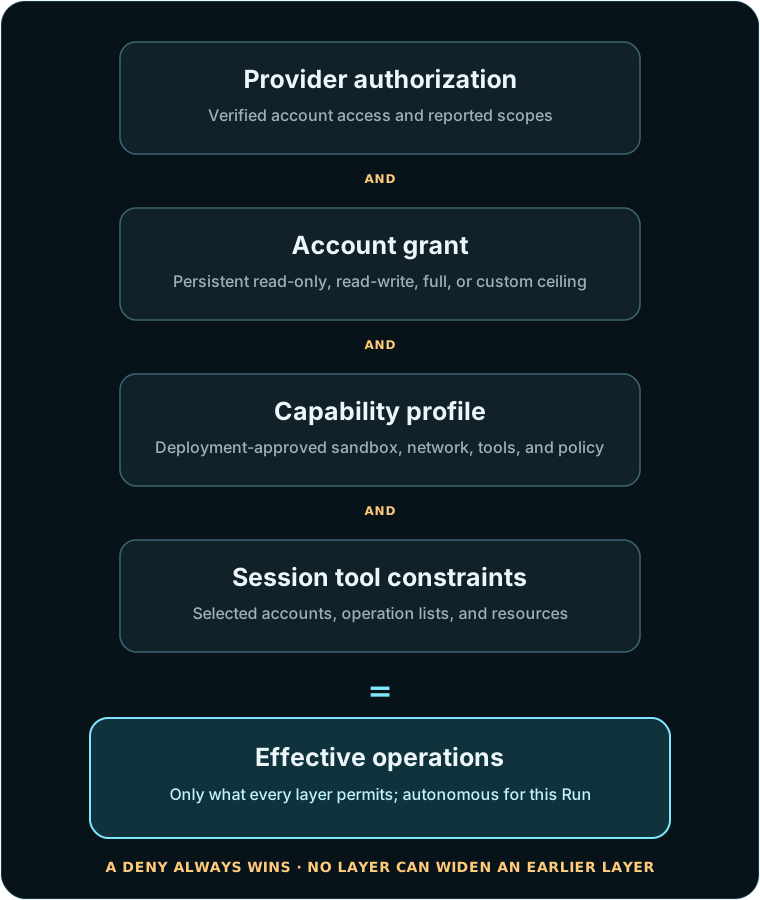
Integration permissions follow the capability envelope: provider authorization, the persistent grant, the profile ceiling, and Session tool or local execution narrowing must all permit the operation. A full-access provider key can be exposed to Rat as read-only; a Rat grant cannot widen a read-only provider token.
| Rat preset | Eligible operation access |
|---|---|
read-only |
read |
read-write |
read, write |
full |
read, write, full |
custom |
IDs explicitly listed in allowOperations |
Provider and Rat permission remain separate. When a provider reports granular scopes, both layers
enforce them. When an API key is broad or the provider does not expose scope metadata, the
connection honestly records coarse or unknown; Rat still enforces its grant, but the provider
credential itself remains broad.
For tighter control on a write-only account alias, replace the persistent grant:
rat-things grant slack-customer-post --file /secure/config/slack-customer-post-grant.json
{
  "version": "1",
  "preset": "custom",
  "allowOperations": ["slack.messages.post"],
  "denyOperations": [],
  "resourceConstraints": {
    "channel": ["C01234567"]
  },
  "expiresAt": "2026-12-31T23:59:59Z"
}
resourceConstraints match operation input fields before the credential is read, and every
constraint applies to every operation admitted by that grant. An operation whose input omits a
constrained field is rejected. For example, do not combine slack.messages.search—whose input is
only query—with the channel-constrained grant above. Use a separate read-only alias for search
and a write-only, channel-constrained alias for posting.
Every exposed operation is autonomous during the Run, so omit or deny it unless its full admitted input range is safe.
6. Rotate or revoke safely#
Rotation uses the same credential-only file journey as connection setup:
rat-things rotate stripe-acme-shop --credential-file /secure/tmp/stripe-rotated.json
rat-things revoke stripe-old-account
Rat verifies a rotated credential before replacing the stored value and rejects it if its provider tenant or subject differs from the existing connection. Revocation marks the connection inactive and asks the vault to delete the credential. Existing run requests cannot bypass revocation because connection status is checked again when an agent tool session is created.
The raw rotation API request is {"version":"1","credential":{...}}.
Self-hosted OAuth installation#
Rat Things includes an authorization-code/PKCE callback and automatic refresh lifecycle in each AWS deployment. It is still bring your own OAuth application: the operator registers the provider app, accepts any provider review, chooses the installed plugin scopes, and stores the app credential in that deployment's AWS Secrets Manager. Rat never operates a central OAuth client or receives the credential.
The first apply can leave OAuth unconfigured. Read terraform output -raw oauth_callback_url,
register that exact HTTPS URL with the provider, and create a secret containing:
{
  "client_id": "provider-application-id",
  "client_secret": "provider-application-secret"
}
Then pass only its ARN and apply again:
integration_oauth_app_secret_arns = {
  slack = "arn:aws:secretsmanager:us-west-2:111122223333:secret:rat/oauth/slack-AbCdEf"
}
GET /v1/integrations/plugins reports oauthInstallation.status as configured or
host-required and returns the exact callback URL. Start a connection from the desktop Connections
page or the CLI:
rat-things connect slack --oauth --wait --access read-write --alias slack-work
# Add --no-browser on a headless operator host and open the printed URL elsewhere.
rat-things slack-events slack-work --profile read-only --json
--wait polls only the owner-scoped connection catalog and returns the verified connection bundle
after the callback succeeds. Omit it when the shell should return the expiring authorization URL
immediately. The URL and callback never contain the provider application secret or issued token.
Reconnect an installed OAuth account with:
rat-things connection reconnect slack-work --oauth --wait
Reconnect state is bound server-side to the authenticated owner and existing connection ID. The callback preserves that connection's stable alias, Rat grant, schedules/source bindings, and provider scopes selected by the trusted plugin. Rat verifies the exchanged credential resolves to the exact same provider tenant and subject before replacing the old secret. Choosing a different provider account fails closed and leaves the stored credential unchanged.
The authenticated start call creates a ten-minute, owner-bound state, stores only its SHA-256 hash, and generates an S256 PKCE challenge. The public callback atomically consumes that state before code exchange, verifies the resulting provider identity through the ordinary connection service, and only then persists the credential. Provider endpoints, scopes, and token authentication method come from the reviewed compiled plugin; callers cannot substitute them.
When a provider issues expires_in and a refresh token, the credential broker refreshes two minutes
before expiry behind a short per-connection DynamoDB lease. Refresh responses replace the same
Secrets Manager value. Concurrent workers wait for that replacement. Terraform gives the MicroVM
only the configured application-secret ARN map; the execution role may resolve only those exact
secrets, and neither the application secret nor issued tokens enter the agent's prompt or tool
arguments. A provider that does not issue a refresh token requires reconnection after expiry.
Slack uses two independently rotating OAuth token families in one owner-scoped credential. The bot
token receives app_mentions:read, chat:write, and reactions:write; the delegated installing-user
token receives search:read. Message search therefore sees only what that Slack user is allowed to
see. Rat uses the user token only for slack.messages.search and the bot token for identity, posts,
replies, reactions, and source delivery. Each access/refresh/expiry family is refreshed separately;
a response to one refresh is not required to repeat the other token family.
slack-events derives the workspace selector from the verified Connection rather than accepting a
caller-supplied team ID. It creates one owner Connection Set and a team-wide source binding,
idempotently repairs the service Connection grant to read-write, and binds the source to the
selected Agent and environment. Only one Connection may route mentions for a workspace;
attempting to enable another returns a conflict instead of silently changing credentials. The
trusted notifier may use the bound service Connection to reply in the source thread even though the
Agent tools remain explicitly declared and separately credentialed.
For supported behavior and current limitations, see Status and roadmap.
Never place a token or application secret in a command-line argument, webhook body, Agent, Session request, DynamoDB record, or URL. Keep provider exchange logs redacted. Already-issued OAuth tokens and API keys remain supported through the manifest-driven credential-file flow.
Source-bound permissions#
A verified webhook source selects an owned Agent, environment and optional delivery connection set only after provider signature verification:
rat-things bind-source --file /secure/config/client-channel-binding.json
{
  "version": "1",
  "sourceKind": "slack",
  "selector": {
    "teamId": "T01234567",
    "channelId": "C01234567"
  },
  "agentId": "agent_example",
  "environment": { "type": "openai_hosted", "environment_template_id": "envtpl_example" },
  "connectionSetId": "customer-ops"
}
Selectors match trusted normalized source fields. The authenticated operator owns the binding
and its Sessions; provider attribution does not grant ownership or embed a credential. Generic source-binding creation is currently a trusted operator action; do not
delegate arbitrary selectors to tenants. For Slack, prefer slack-events: it derives teamId from
the verified OAuth Connection and atomically refuses a competing exact workspace claim.
Built-in and fixture integrations#
| Plugin | Operations | Availability |
|---|---|---|
| Linear | Team/workflow discovery, issue search/get/create/update, comment create | Built in |
| Slack | API test, message search/post, reaction add | Built in |
| Stripe | Customer search, invoice list, refund create | Built in |
| Fixture CRM | Record search/create with two permission-distinct accounts | Tests only |
The HTTP adapters pin credential-free API base URLs, reject redirects and origin escapes, bound
request/response bodies, and attach credentials only inside trusted code. Fixture CRM is compiled
only when INTEGRATION_PLUGIN_BASE_URLS supplies its base URL. It exists to prove onboarding,
verified identity, provider scopes, multiple accounts, autonomous read/write intersection,
exactly-one fixture mutation, and secret non-disclosure without depending on a customer's
third-party account.
Add a trusted integration#
Integration plugins are trusted TypeScript adapters compiled into the MicroVM image:
- Define an
IntegrationPluginManifestinsrc/plugins/integrationswith a lowercase plugin ID, authentication definitions, and namespaced operation IDs. - Implement
verifyCredential. Call a fixed provider identity endpoint and return a bounded label, provider authorization, and stable tenant/subject IDs when available. Never trust those values from the connection-create request. - Define each operation's access, risk, required provider scopes, and closed JSON input schema.
- Prefer
TrustedHttpIntegrationPlugin: use a credential-free HTTPS base URL and construct only relative paths from validated inputs. Never let the model provide an origin. - Register the adapter in
src/plugins/integrations/builtins.tsand rebuild the trusted image. - Add contract, simulation, LocalStack, and disposable live-AWS tests. Prove a read, an autonomously admitted write, a denied credential/scope, account selection, and absence of secret values.
Ingress signature parsing remains in src/ingress/src/channels; outbound result notification
remains in src/delivery. Agent-callable integration operations belong here. The architecture check
enforces those boundaries.
For failures, follow integration diagnostics. For consumer architecture and OAuth ownership, see embedding and self-hosting.